Comprehensive User Manual & Operations Guide
Complete operational guide for Southern Multi-State Co-operative Society Ltd. Detailed step-by-step workflows for Administrators, HR Personnel, Department Heads, and Employees.

Table of Contents
Welcome to Southern MCS HRMS
The Southern Multi-State Co-operative Society Human Resource Management System (HRMS) is an enterprise workforce governance platform designed to centralize society operations across all branches. It provides end-to-end automation for personnel onboarding, biometric attendance ingestion, multi-level leave approvals, structured payroll cycles, travel reimbursements, and performance appraisals.
Admin & HR Portal
Full operational control over branches, employees, attendance reconciliation, salary generation, and governance policies.
Employee Portal (ESS)
Personal self-service dashboard for attendance calendars, leave applications, monthly payslips, and travel claims.
Branch Kiosk Terminal
Touch-friendly tablet mode deployed at society branches for instant employee self-punch and biometric fallback.
Pro-Tip: Global Instant Search
Press Ctrl + K anywhere in the application to open the Global Quick Search modal to locate employees, navigate to modules, or access settings instantly.
Access Portals & Authentication
Southern MCS HRMS supports three distinct authentication entry points tailored to varying work environments and device types across branches.
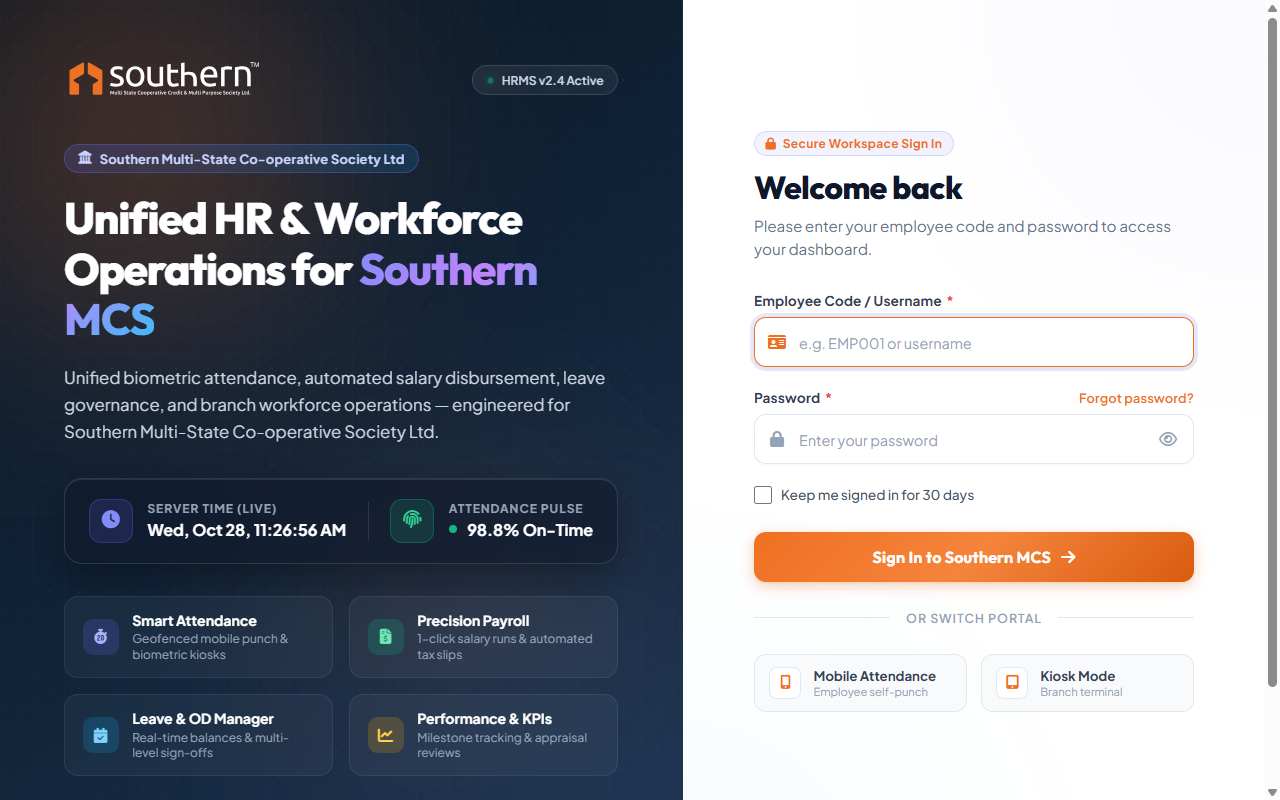
1. Primary Web Portal (`/login`)
- URL:
http://your-domain/login - Credentials: Enter your registered Employee Code (e.g.
10849) or Username and secure password. - Password Visibility: Click the eye icon () to preview entered password before submission.
- Keep Signed In: Check "Keep me signed in for 30 days" on personal workstations to prevent session timeouts.
- Role Routing: Super Admins and HR personnel are directed automatically to the Admin Dashboard, while branch employees are routed to the Employee Portal.
2. Branch Kiosk Mode (`/kiosk`)
Designed for wall-mounted tablet terminals at branch reception desks:
- No login password required for the kiosk station.
- Employee types their Employee Code and presses Punch In / Out.
- Real-time timestamp and branch geolocation are recorded immediately.
3. Mobile Attendance Portal (`/mobile/login`)
Optimized for smartphones and field agents:
- Lightweight touch-friendly interface.
- Mobile GPS geofencing verification against assigned branch coordinates.
- Quick self-punch with immediate feedback.
Admin Dashboard & Live Attendance Pulse
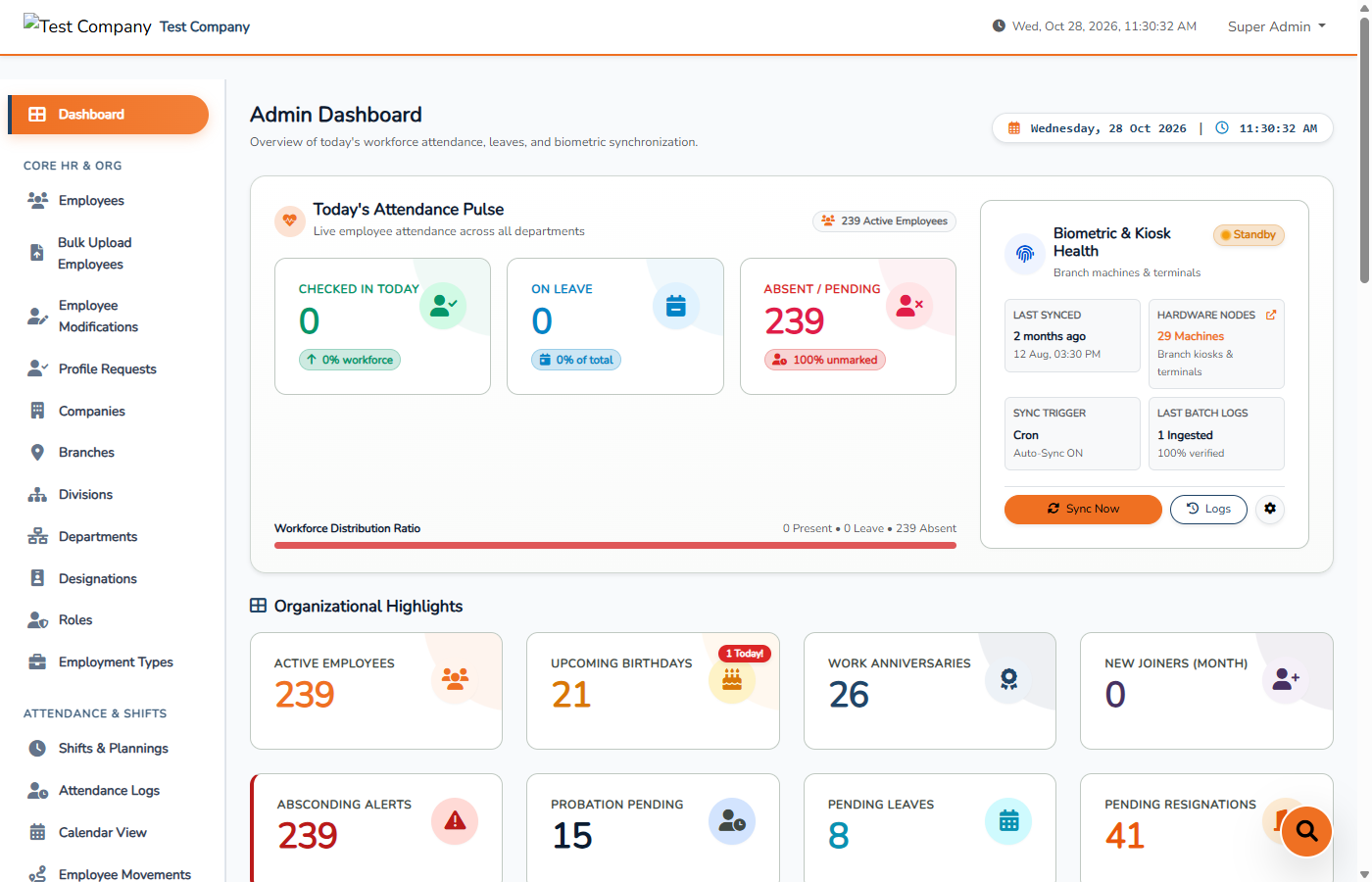
The Admin Dashboard provides real-time oversight of the entire society workforce, daily biometric sync status, and priority employee alerts.
Key Dashboard Sections
Today's Attendance Pulse
Tracks the ratio of Checked In Today, Approved On Leave, and Absent / Pending staff across all branches. The visual bar provides immediate percentage visibility into workforce presence.
Biometric & Kiosk Health
Monitors biometric machine nodes (eSSL/ZKTeco) and cron sync schedules. Administrators can click "Sync Now" to trigger an immediate on-demand punch ingestion from all branch hardware terminals.
Operational Bento Metrics
Live metric tiles showing Active Employees, Upcoming Birthdays (with confetti badge), Work Anniversaries, and New Joiners for the current calendar month.
Critical Action Cards
Direct indicators for items requiring HR intervention: Absconding Alerts, Pending Probation Reviews, Unapproved Leaves, and Pending Resignations.
Employee Master Directory & Lifecycle
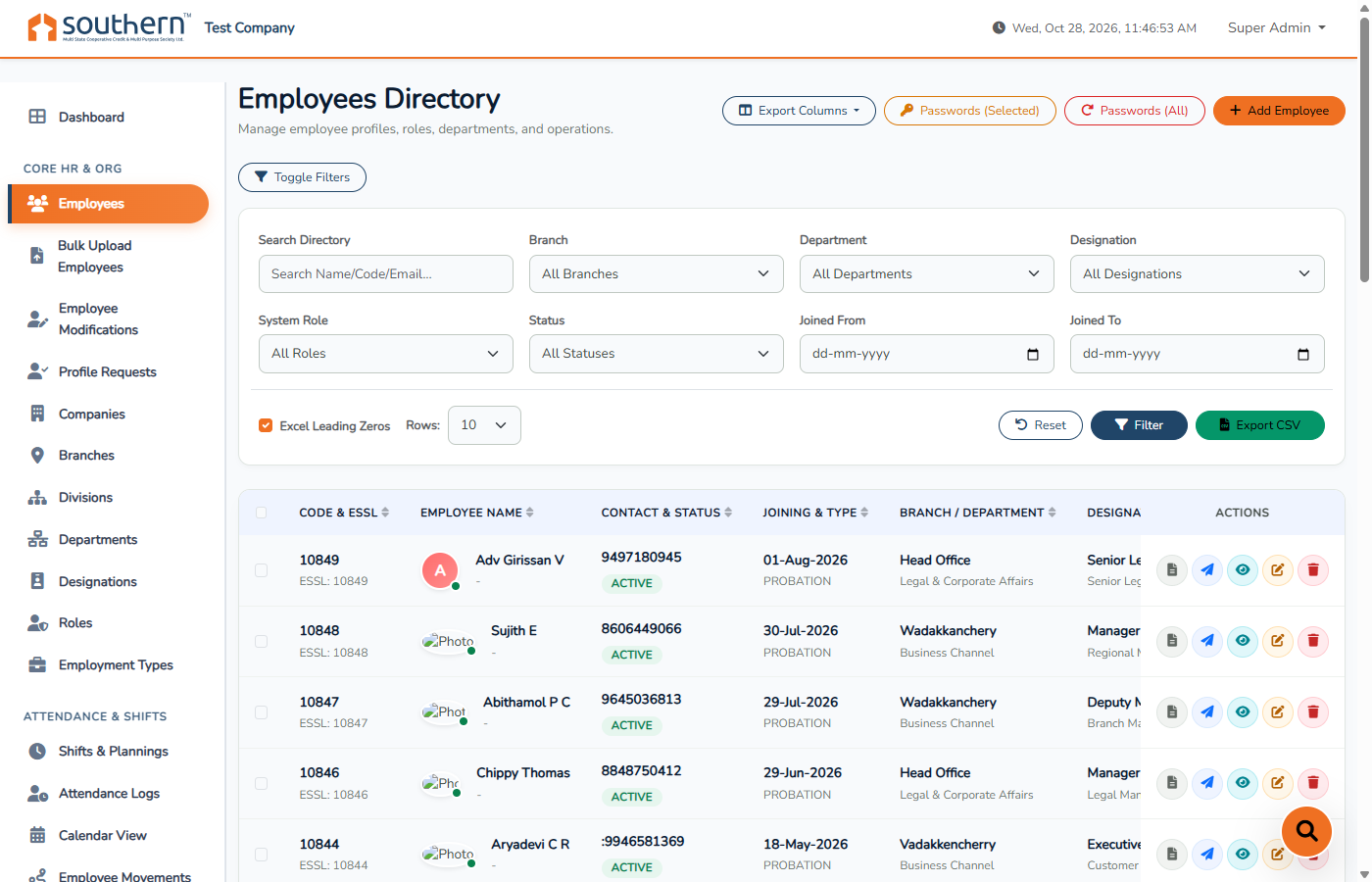
The Employee Directory is the central repository for all Southern MCS personnel records, statutory compliance data, KYC documents, and career movements.
Step-by-Step Employee Management Workflows
- Navigate to Core HR & Org → Employees and click the orange "+ Add Employee" button.
- Fill in the Primary Information: Employee Code, ESSL ID (for biometric machine matching), First & Last Name, Official Email, and Phone.
- Assign organizational tags: Branch, Division, Department, and Designation.
- Assign employment terms: Employment Type (Permanent, Probation, Contract) and Joining Date.
- Set system credentials: User Login ID, Role (Employee, HR, Manager), and initial temporary password.
- Save to create the profile. The system automatically creates default annual leave allotments and profile structures.
When deploying HRMS for multiple branches or hundreds of personnel at once:
- Navigate to Core HR & Org → Bulk Upload Employees.
- Download the provided official sample CSV template.
- Populate the spreadsheet with employee codes, names, branch names, department IDs, and salary info.
- Upload the CSV and use the Mapping Preview screen to confirm column associations before committing to the database.
Employees cannot arbitrarily change sensitive banking or statutory data without verification:
- Employees submit change requests for Bank Accounts, PAN, or Addresses from their Self-Service portal.
- HR reviews the modification in Core HR & Org → Profile Requests.
- HR verifies the attached supporting proof document and clicks Approve or Reject with Remarks.
Leave Governance, Accrual & Approvals
Southern MCS features a rule-based leave management engine supporting multi-period allotments, half-day leaves, medical certificates, and multi-tier sign-offs.
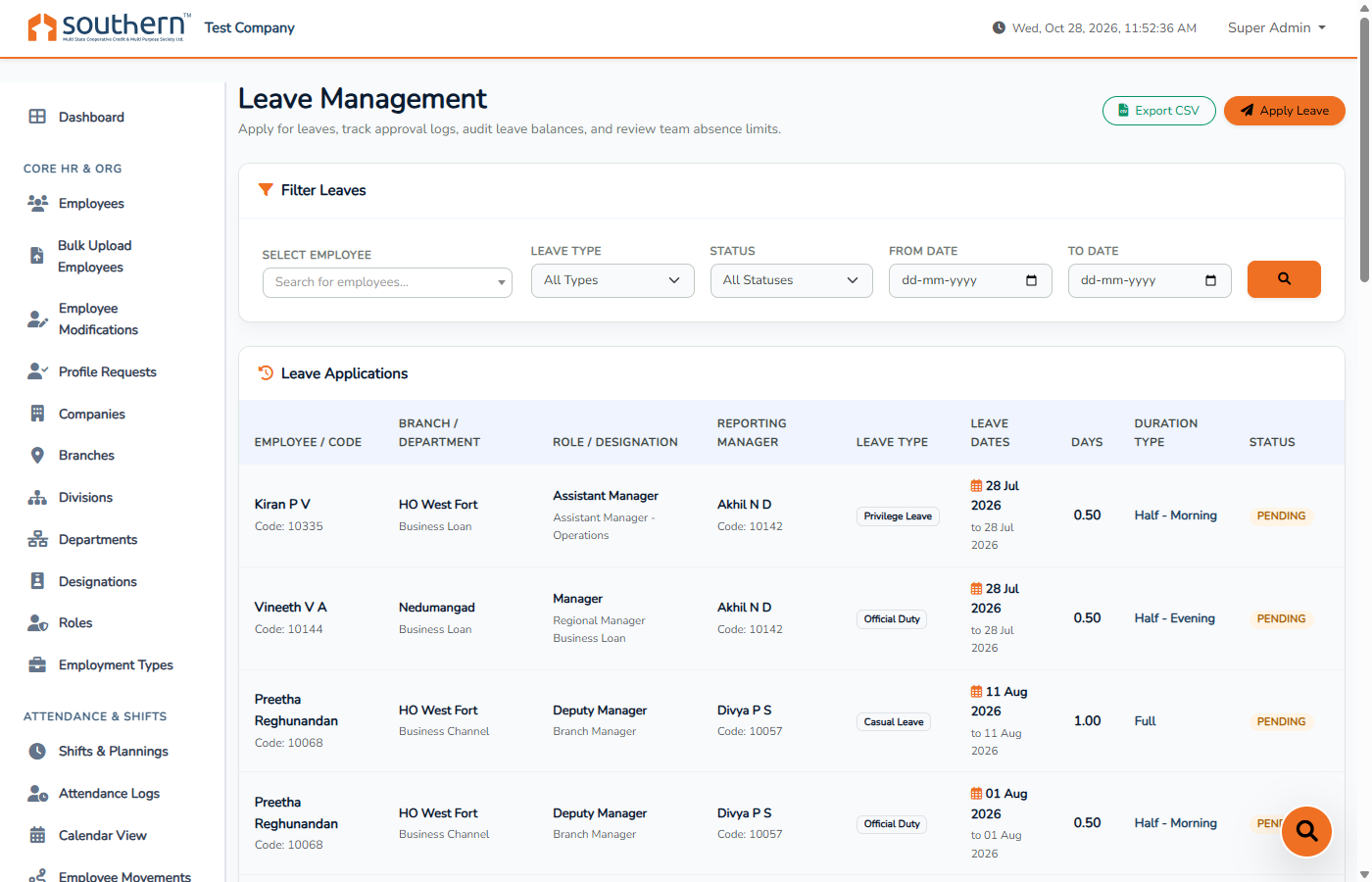
| Leave Type | Code | Typical Allotment | Rules & Restrictions |
|---|---|---|---|
| Casual Leave | CL |
12 days / year | Requires 24h advance application. Maximum 3 consecutive days. |
| Sick / Medical Leave | SL |
12 days / year | Can be applied post-facto. Medical certificate mandatory if > 2 days. |
| Privilege / Earned Leave | PL / EL |
15 - 18 days | Accrues based on active service. Eligible for encashment or carryover. |
| Official Duty | OD |
As needed | Used for field visits, auditor meetings, and society branch transfers. |
| Loss of Pay | LOP |
Variable | Deducts proportional daily wage during monthly payroll computation. |
Leave Freeze Feature During Payroll Processing
During monthly payroll finalization (typically from the 25th to the 1st of the month), HR can activate "Leave Freeze" from the Payroll panel. When active, employees cannot create or modify leave requests for the locked period, guaranteeing 100% calculation consistency.
Payroll Processing & Salary Structures
The Payroll Module automates the end-to-end salary cycle: factoring in biometric work days, approved paid leaves, LOP deductions, statutory EPF/ESI contributions, loan recoveries, and issuing tamper-proof PDF payslips.
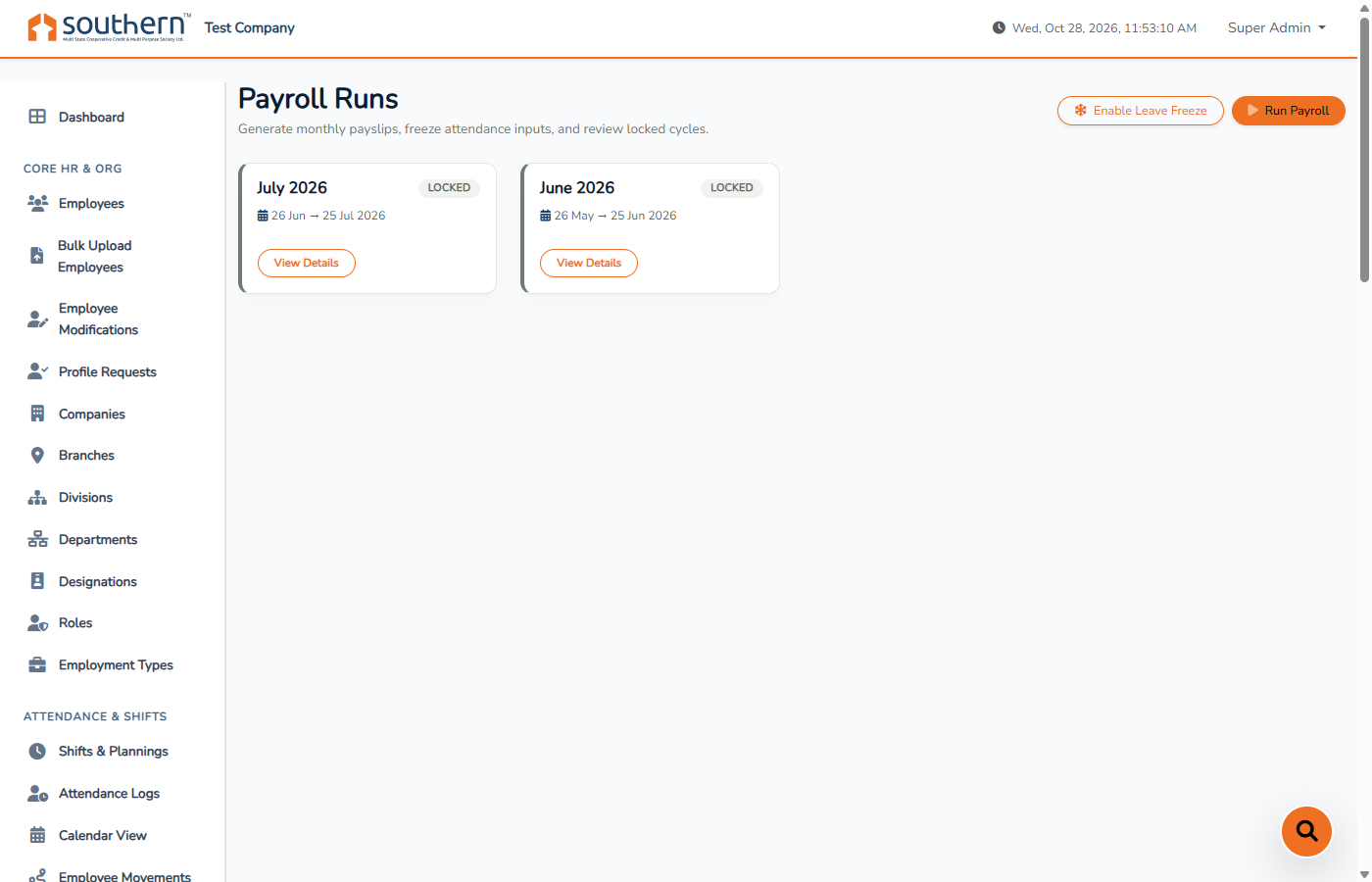
The 4-Step Monthly Payroll Execution Cycle
Attendance Audit
Reconcile biometric machine punches, resolve unmarked absentees, and confirm holiday calendars.
Arrears & Deductions
Enter bonus payouts, festival advances, society loan installments, or manual wage adjustments.
Run Computation
Click "Run Payroll". The system calculates earnings, statutory deductions, and net payable in seconds.
Lock & Release
Verify draft pay register, click "Lock Cycle", and publish digital payslips to employee portals.
Branch Kiosk & Mobile Web Attendance
For society branches without network-connected fingerprint hardware, Southern MCS provides a dedicated touch-screen Branch Kiosk Station.
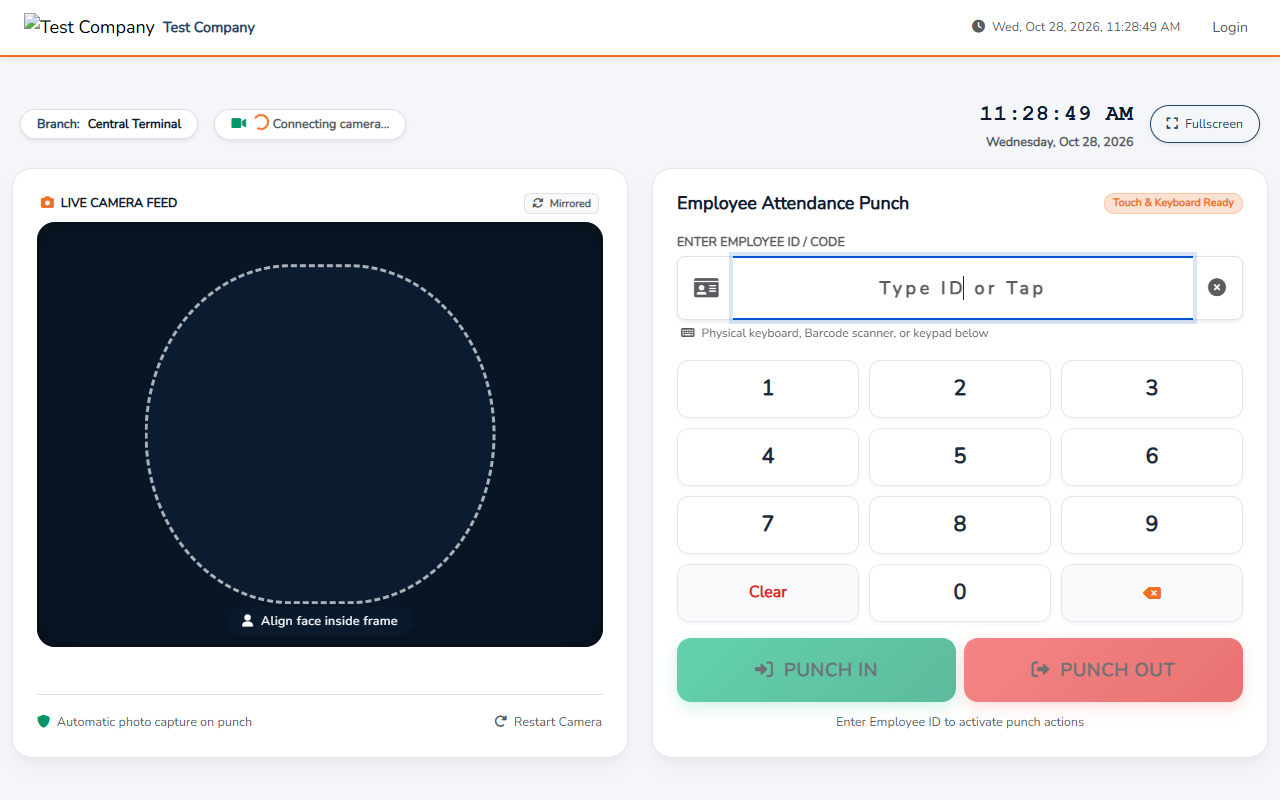
How Branch Kiosk Operates:
- A branch tablet or dedicated PC is opened to
/kioskin browser fullscreen mode (F11). - Employees arrive at the branch and type their Employee ID on the on-screen keypad.
- The terminal identifies the employee, shows their photo, and confirms "Punch In Recorded" or "Punch Out Recorded" with exact server timestamp.
- Punches immediately sync to the central HRMS attendance register without any manual pen-and-paper registers.
Frequently Asked Questions & Troubleshooting
2. Click "Sync Now" to trigger an instant synchronization.
3. Check that the employee's ESSL ID in their profile strictly matches the User ID registered in the physical biometric device.
2. Select the checkbox next to the employee's name.
3. Click "Passwords (Selected)" button in the top action bar to reset or generate a secure new password.
Need Additional Technical Support?
Contact Southern Multi-State Co-operative Society Central IT & HR Operations Support.